
Dual Display 0-100V / 0-10A Panel Meter
Dual Display 0-100V / 0-10A Panel Meter Original price was: 150৳ .Current price is: 140৳ .
Back to products
1.8inch Arduino TFT Display Module
1.8inch Arduino TFT Display Module Original price was: 790৳ .Current price is: 770৳ .

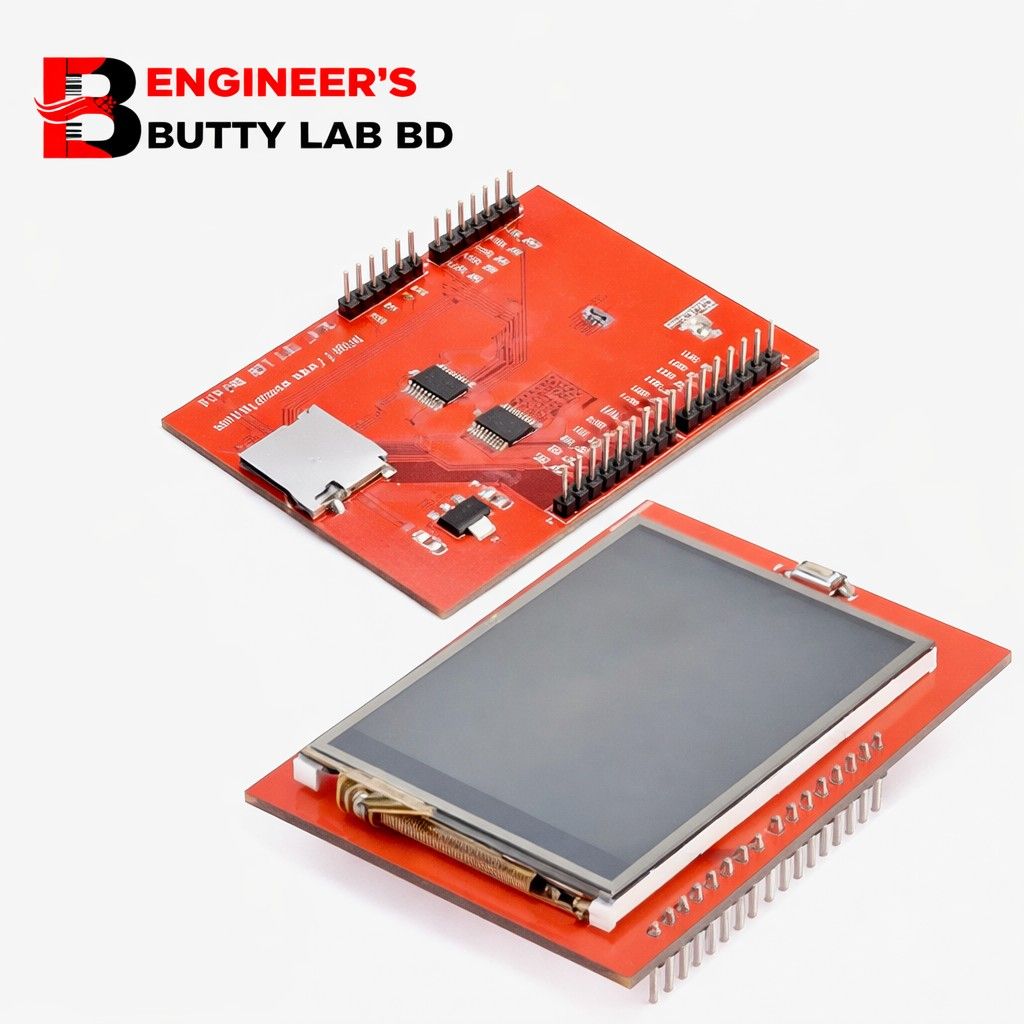
2.4 inch TFT LCD Touch Display For Arduino

SKU: EBL-1080

Specifications:

  • Display Size: 2.4″ TFT LCD touch screen
  • Resolution: 240×320, 18-bit (262,000) color
  • Controller: SPFD5408 with built-in video RAM buffer
  • Digital Interface: 8-bit digital interface with 4 control lines

Original price was: 850৳ .Current price is: 830৳ .

13 in stock

Ordered:0
Items available:13

13 in stock

10 People watching this product now!

Payment Methods:

Description

🖥 2.4 Inch TFT LCD Touch Display for Arduino

240×320 RGB | SPI/Parallel | Resistive Touch | Arduino Shield Compatible


📌 Overview

The 2.4 inch TFT LCD Touch Display for Arduino is a compact, full-color graphical display module designed especially for Arduino boards. It provides:

  • 📏 2.4-inch screen size

  • 🎨 240 × 320 pixel resolution (QVGA)

  • 🌈 65K RGB color support

  • ✍️ Resistive touchscreen input

  • 🔌 Direct Arduino UNO shield compatibility

It is ideal for building user interfaces, control panels, dashboards, and interactive projects.


📐 Display Specifications

Feature Specification
Screen Size 2.4 Inches
Resolution 240 (Width) × 320 (Height)
Display Type TFT LCD
Color Depth 16-bit (65,536 colors)
Driver IC ILI9341 / ILI9325 / ST7789 (varies by model)
Backlight White LED

🎨 Display Features

✔ Full-color graphical display
✔ High brightness
✔ Clear text and image rendering
✔ Supports custom fonts and graphics
✔ Fast refresh rate

Unlike 16×2 LCD, it can display:

  • Images

  • Graphs

  • Icons

  • Menus

  • Animations

  • Touch-based UI


✍️ Touchscreen Specifications

Feature Specification
Touch Type Resistive
Touch Points Single-touch
Touch Method Pressure-based
Touch Controller XPT2046 (common)

Resistive touch allows:

  • Finger input

  • Stylus use

  • Works with gloves


🔌 Interface & Communication

1️⃣ Arduino Shield Version (Parallel)

  • Directly plugs into Arduino UNO

  • Uses multiple digital pins

  • Faster refresh compared to SPI

2️⃣ SPI Version

  • Uses fewer pins

  • Suitable for ESP32, STM32, etc.

Common Pins:

  • VCC

  • GND

  • CS

  • RESET

  • DC

  • MOSI

  • MISO

  • SCK

  • LED


⚡ Electrical Specifications

Parameter Value
Operating Voltage 3.3V – 5V
Logic Level 3.3V (some boards have level shifter)
Power Consumption Moderate
Backlight Current Low to Medium

📏 Physical Specifications

  • PCB Color: Red (most common)

  • Mounting Holes: 4 corners

  • Compact and lightweight

  • Stackable Arduino shield format

  • Standard 0.1″ header pins


🧠 How It Works

  1. Arduino sends pixel data to TFT driver IC.

  2. Driver IC controls RGB subpixels.

  3. Backlight illuminates screen.

  4. Touch controller detects screen press.

  5. Coordinates are sent back to Arduino.


🎯 Advantages

✔ Plug-and-play with Arduino UNO
✔ Touch-enabled interface
✔ Full graphical capability
✔ Affordable solution
✔ Suitable for beginners & professionals


📦 Applications

  • Menu-driven systems

  • Smart home interface

  • Industrial control panels

  • IoT dashboards

  • Temperature monitoring system

  • Medical display units

  • DIY gaming projects

  • Robotics control interface


🆚 Comparison: 2.4″ vs 2.8″

Feature 2.4″ TFT 2.8″ TFT
Screen Size 2.4″ 2.8″
Resolution 240×320 240×320
Cost Lower Slightly Higher
Board Size Smaller Larger

🛠 Example Arduino Usage

#include <Adafruit_GFX.h>
#include <Adafruit_TFTLCD.h>

void setup() {
// Initialize display
}

void loop() {
// Draw graphics or text
}


⚠ Important Notes

  • Ensure correct driver library.

  • Check display controller model before coding.

  • Avoid applying pressure too hard on touchscreen.

  • Use proper voltage level.

Customer Reviews

0 reviews
0
0
0
0
0

There are no reviews yet.

Be the first to review “2.4 inch TFT LCD Touch Display For Arduino”

Your email address will not be published. Required fields are marked *

1 2 3 4 5
1 2 3 4 5
1 2 3 4 5